Table of Contents
Technology plays an important role in modern business operations. From managing emails and customer information to maintaining networks and protecting sensitive data, businesses need reliable IT support to keep their systems running smoothly.
However, one important question many business owners face is whether to hire an in-house IT team or partner with a managed IT services provider.
Understanding managed IT services vs in-house IT can help businesses choose an approach that fits their budget, operational needs, and future growth plans. For companies in Delhi NCR and across India, the right decision depends on the complexity of their IT infrastructure and the level of support they require.
What Are Managed IT Services?
Managed IT services involve outsourcing some or all IT support and maintenance responsibilities to an external provider under an agreed service arrangement.
Depending on the provider and contract, services may include:
- Computer and network maintenance.
- IT helpdesk and troubleshooting.
- Cybersecurity support and system updates.
- Backup monitoring and recovery assistance.
- Cloud and infrastructure management.
- Remote monitoring and technical support.
This model allows businesses to access external technical expertise without necessarily building a large internal IT department.
What Is In-House IT Support?
In-house IT support means employing IT professionals directly within your organization. They manage technology-related tasks according to the company’s requirements and priorities.
Their responsibilities may include maintaining computers and servers, resolving employee issues, managing user accounts, monitoring networks, and coordinating technology upgrades.
An internal team can develop a detailed understanding of the company’s systems, workflows, and business priorities.
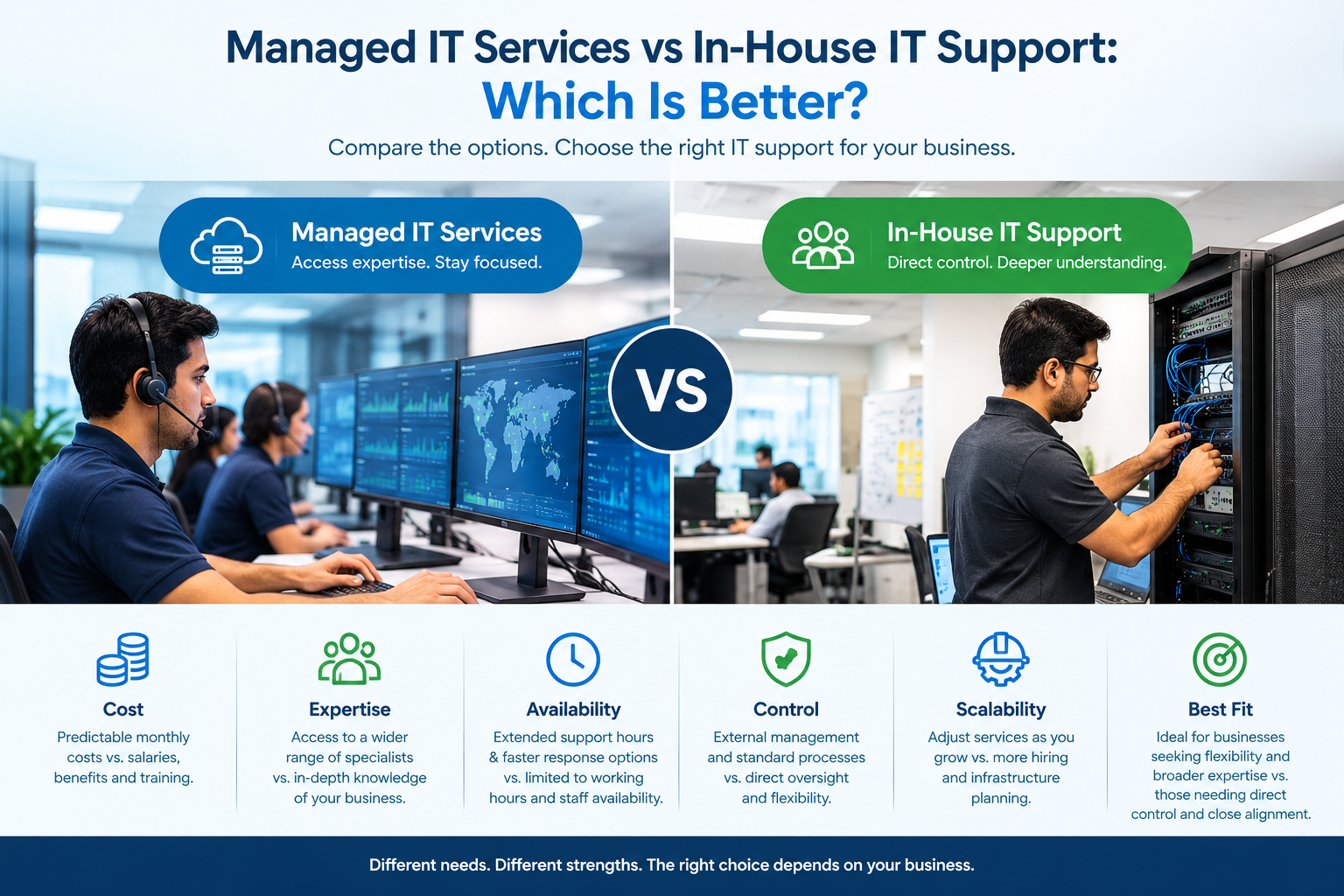
Managed IT Services vs In-House IT: Key Differences
1. Cost and Budget Planning
Hiring in-house IT staff involves salaries, recruitment, training, employee benefits, and ongoing professional development. Additional specialists may be required as the business grows.
Managed IT services generally involve an agreed recurring fee, although pricing depends on the scope of services, number of users, infrastructure, and support requirements.
Best approach: Managed services may suit businesses seeking predictable support costs, while larger organizations with substantial ongoing IT workloads may benefit from dedicated internal staff.
2. Access to Technical Expertise
An in-house team provides direct access to employees who understand your business environment. However, a small team may not have specialist knowledge across every area of IT.
A managed services provider may offer access to professionals covering networking, cybersecurity, cloud systems, and infrastructure management.
Best approach: Consider managed services if your business needs several technical skills but cannot justify hiring separate specialists.
3. Availability and Response Times
An internal IT employee may be readily available during working hours, but coverage can be limited by workload, leave, or staff shortages.
Managed IT providers may offer extended-hours support or defined response targets, depending on the service agreement.
Before choosing a provider, review its support hours, escalation process, and contractual response commitments.
4. Control and Business Knowledge
In-house IT staff work closely with employees and can prioritize tasks based on internal business needs.
An external provider brings specialized resources but needs clear documentation, communication, and agreed priorities to understand your environment effectively.
Best approach: Businesses with highly specialized systems or strict internal requirements may prefer dedicated staff, while standardized IT environments may be suitable for outsourced support.
Can Your Business Combine Both Models?
Yes. A hybrid IT support model combines internal IT employees with an external managed services provider.
For example, an internal IT coordinator might manage employee requests and business applications while an external provider supports network monitoring, cybersecurity, backups, or specialist infrastructure.
This approach can help organizations retain internal control while accessing additional expertise when required.
How to Choose the Right IT Support Model
Before making a decision, evaluate your IT budget, number of employees, security requirements, internal technical skills, and expected business growth.
Consider the complexity of your systems, the level of support coverage required, and the consequences of unexpected downtime. Compare the total cost and scope of each option rather than looking at monthly fees alone.
Businesses in Delhi NCR should also consider whether the provider can offer the remote or on-site assistance their operations require.
Conclusion
There is no single IT support model that works best for every business. Managed IT services can provide access to broader technical expertise and flexible support arrangements, while in-house IT teams offer direct control and close alignment with internal operations.
For some organizations, a hybrid approach may provide the right balance.
The best choice is the one that supports your business objectives, protects your technology investments, and keeps your employees productive.
Looking for IT support that fits your business needs?
Rational Systems can help you explore IT support, networking, and technology solutions for your organization. Visit rational.co.in to learn more about our services and discuss your IT requirements.
Choose an IT support strategy that works for your business today and can adapt as you grow.