

Table of Contents
Introduction
Here is something nobody tells you when you buy a Wi-Fi access point, hand it to an electrician, and assume the job is done.
Wi-Fi can be installed wrong.
Not broken. Not visibly faulty. Not blinking an error code. Just wrong — in a way that looks perfectly normal from the outside, passes a basic connectivity test, and then quietly fails every person in the building for the next three years while everyone assumes the internet provider is the problem.
Access points are the most misunderstood devices in any network. They are not the router. They are not the switch. They are the devices that take your wired network and broadcast it as the Wi-Fi signal every device in your building connects to. They are, in practice, the single component that determines whether your wireless network is a reliable professional infrastructure or an expensive illusion of one.
And there are rules for installing them correctly.
Almost nobody follows them.
Not because the rules are complicated. Not because the equipment is difficult to configure. But because correct installation requires a professional site survey before anything is plugged in — and site surveys happen before problems appear, which means they are almost always the first thing cut from the budget.
Until the CEO cannot load his emails at the all-hands meeting. Then suddenly everyone wants a site survey. Urgently. Yesterday. Why wasn’t this done already.
In this article, we are going to walk through the four most common access point installation mistakes we encounter in offices, schools, hotels, and large buildings across Delhi NCR. We will explain exactly why each one causes the symptoms you are probably already experiencing. And we will explain the one professional process that prevents all of them before a single cable is run.
A Quick Explainer: What an Access Point Actually Does
Before we get to the mistakes, a brief explanation for anyone who has ever been handed a box of networking hardware and told to figure it out.
A wireless access point is the device that creates the Wi-Fi signal in a physical space. It connects to your network via a wired Ethernet cable — typically powered by PoE (Power over Ethernet), meaning the same cable carries both data and electricity — and broadcasts that network connection as a Wi-Fi signal that wireless devices can join.
It is not the router, which manages traffic between your network and the internet. It is not the switch, which distributes the wired network to multiple devices and access points. It is the last device in the chain — the one that translates your wired network infrastructure into the wireless signal your laptop, phone, tablet, and every other wireless device connects to.
One access point, correctly placed and correctly configured, can serve a specific area reliably. The problems begin when the number of access points, their placement, and their configuration do not match the physical reality of the building they are supposed to serve.
Which brings us to the mistakes.
Mistake 1: One Access Point Per Floor
This is the most common mistake, and the one with the most predictable consequences.
The logic is understandable: one floor, one access point, job done. It sounds reasonable until you consider what one access point is actually capable of. A single enterprise access point, under ideal conditions — open space, no interference, no physical obstacles — covers approximately 50 to 70 metres in radius. In a real building with concrete walls, glass partitions, metal furniture, and a few dozen people competing for bandwidth, that coverage area shrinks dramatically and the capacity thins even faster.
Now put 200 people on that single access point. All of them in meetings, on calls, streaming presentations, sending files, running cloud applications simultaneously.
What you have is not a Wi-Fi network. What you have is 200 devices fighting over a single radio — and radio is a shared medium. Unlike a wired switch, where each device gets its own dedicated connection, wireless bandwidth is divided between every device connected to the same access point simultaneously. As device count increases, available bandwidth per device decreases proportionally. As physical distance from the access point increases, individual device speeds drop and the time each device occupies the shared radio channel increases — making the problem worse for everyone else.
The practical experience of this is familiar to anyone who has worked in an under-provisioned office: full bars on the Wi-Fi indicator, connected with no issues, and yet websites load slowly, Teams calls buffer mid-sentence, file uploads crawl, and everything feels inexplicably sluggish. The Wi-Fi is not broken. It is simply overwhelmed.
The access point sits peacefully in the comms cabinet at the far end of the building, completely unbothered, serving two hundred people who are silently suffering thirty metres away.
The fix is straightforward: multiple access points, correctly distributed across the floor plate, with coverage areas calculated to provide complete coverage at appropriate density levels for the number of devices and the type of use in each area. A conference room that hosts video calls requires more capacity than a corridor. A trading floor requires different provisioning than a breakout space. None of this can be determined without measuring the actual space.
Mistake 2: Wrong Placement
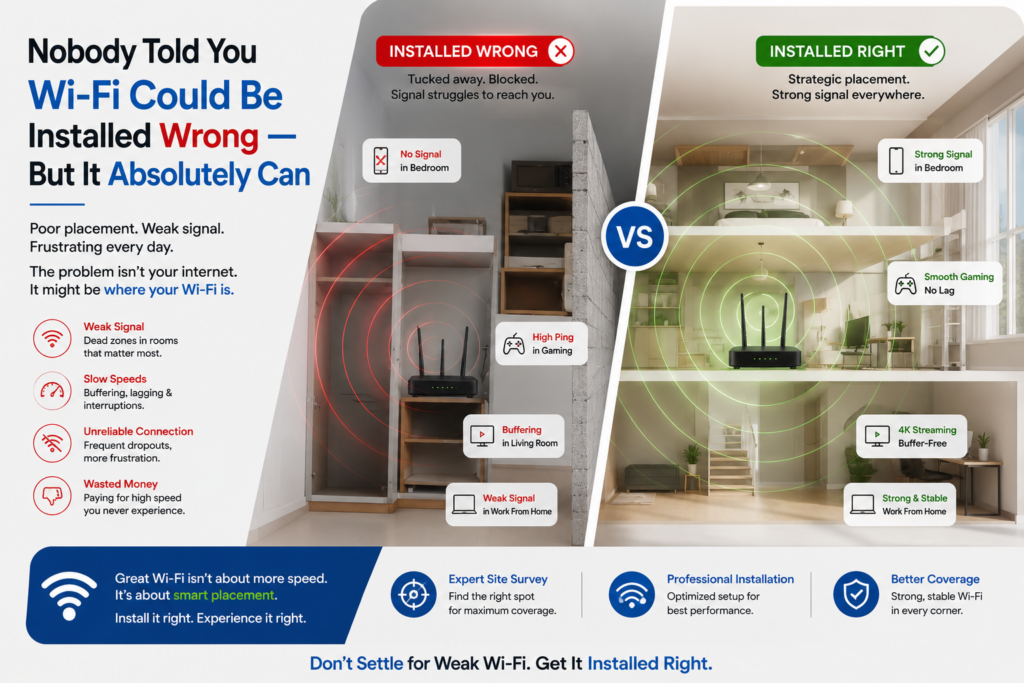
Access point placement is a discipline. It is not intuitive, it is not obvious from looking at a floor plan, and it is almost always wrong when done without measurement tools.
Here is a collection of actual access point placements we have encountered during site surveys of existing installations across Delhi NCR:
Behind a metal pillar. Metal is one of the most effective Wi-Fi signal blockers that exists. An access point mounted directly behind a structural steel column broadcasts its signal in every direction — including directly into the column, which absorbs and reflects it. The coverage pattern becomes unpredictable, with strong signal in some directions and a complete dead zone directly behind the obstruction.
Inside a ceiling tile, facing upwards into solid concrete. This one requires a moment to appreciate. The access point was physically installed inside the ceiling void, with its antennas pointing upward into the concrete slab above it. The signal it was meant to broadcast into the occupied floor below was instead being directed into the structure above. The floor below had partial, degraded coverage. The concrete above had excellent Wi-Fi that nobody would ever use.
In a closed cupboard. Technically installed. Technically connected to the network. Technically able to produce a Wi-Fi signal. The cupboard walls reduced that signal to a fraction of its intended strength by the time it reached any device in the room. The access point was doing its job. The job had been made impossible by its location.
Three access points clustered in one corner, zero in the other half of the building. This is the installation equivalent of placing all the lights in a room into one corner and wondering why half the room is dark. The clustering creates severe co-channel interference — a problem we will come to shortly — in the corner where all three units compete with each other, and complete dead zones in the uncovered half of the building.
Each of these installations passed a basic test: the access points were powered, connected, and broadcasting a Wi-Fi signal. Each of them was, in practice, a professionally installed failure.
Correct access point placement is determined by the physical characteristics of the space: wall materials and thickness, ceiling height, the location of potential interference sources, the shape of the floor plate, and the expected density and usage pattern of wireless devices in each zone. None of this can be assessed from a floor plan alone. It requires measurement — specifically, the RF site survey that almost every installation skips.
Mistake 3: The Sticky Client Problem
This is the most technically subtle mistake on the list, and it is the one that causes the most frustrating user experience — because it feels like a Wi-Fi problem even though it is actually a device behaviour problem that the network design should compensate for.
Here is what happens.
Your phone walks into a building and connects to the access point nearest the entrance. The connection is strong, the signal is excellent, and your device is happy. So far, so normal.
You then walk to the other end of the building. Fifty metres away, there is an access point with full signal strength and almost no connected devices — bandwidth to spare, practically waiting for you. Your phone is now fifty metres from the access point it originally connected to, dragging a signal through three concrete walls and two glass partitions, with a received signal strength of around -80 dBm — technically connected, functionally marginal.
Your phone does not switch to the closer, stronger access point.
Your phone, like a person who refuses to admit a relationship has run its course, maintains its loyalty to the original access point it fell in love with at the door. It will hold that connection until the signal deteriorates to the point of complete failure — which means your calls break up, your files load slowly, and your applications time out for the entire duration of your walk across the building, even though a perfectly good access point is two metres away.
This is called the sticky client problem, and it is a fundamental characteristic of how Wi-Fi works. The decision about which access point to connect to — and when to switch — is made by the client device, not by the network. Not by the access point. Not by the IT administrator. By the device itself, using its own internal logic, which varies by manufacturer, model, operating system version, and driver.
Some devices switch access points aggressively. Some hold their connections stubbornly. Most do something inconsistent that depends on factors invisible to the user. The autocorrect that changes “on my way” to “on my waffle” is operating on similar levels of predictable logic.
A correctly designed wireless network compensates for sticky client behaviour using several mechanisms. Access points can be configured to send BSS Transition Management requests — essentially a polite instruction to the client device that a better access point is available and it should consider switching. Minimum RSSI thresholds can be set, below which an access point stops accepting connections from a device — forcing it to find a stronger signal. Band steering guides dual-band devices toward the 5GHz band where appropriate. 802.11r fast BSS transition and 802.11k neighbour reporting protocols facilitate seamless handoff between access points.
None of these mechanisms are active by default on a basic installation. All of them require deliberate configuration by someone who understands what they are doing and why. And none of them can be correctly configured without knowing the physical layout of the coverage areas — which, again, requires a site survey.
Mistake 4: Channel Interference — Eight People Shouting Simultaneously
Radio frequency is a shared resource. Wi-Fi operates on specific channels within the 2.4GHz and 5GHz frequency bands, and only one device can transmit on a given channel in a given area at a time. When multiple access points in the same physical space are broadcasting on the same channel, they interfere with each other — each one’s transmissions causing every other device on that channel to wait before it can transmit, reducing effective throughput for everyone.
This is called co-channel interference, and it is endemic in poorly planned wireless deployments.
The scenario looks like this: a building has eight access points. All eight are set to auto-configure their channel assignment. The auto-configuration algorithm, lacking any knowledge of the physical layout or the other access points in the building, assigns several of them to the same channel — or worse, assigns them all to the same channel. Every device connected to any of those access points is now competing for airtime on the same frequency with every other device connected to every other access point on that channel, in the same physical space.
Imagine eight people in a meeting room, all speaking at full volume simultaneously, all convinced they are having a normal conversation because they can technically hear responses between the noise. That is your 2.4GHz wireless network at nine on a Monday morning when the office fills up.
The 2.4GHz band has only three non-overlapping channels available — channels 1, 6, and 11. In any building with more than three access points operating on 2.4GHz, some overlap is mathematically unavoidable. The 5GHz band provides many more non-overlapping channels and is significantly less congested, but requires more access points because its signal does not travel as far or penetrate walls as effectively as 2.4GHz.
Correct channel planning requires knowing exactly where every access point will be located, what its coverage area will be, and which other access points it will overlap with — so that overlapping access points can be assigned different channels, and the channel reuse plan minimises interference across the entire building. This is not something that can be done from a spreadsheet. It requires the physical measurement data that comes from a site survey.
The result of poor channel planning is the experience that every person in a busy office knows intimately: the Wi-Fi indicator shows full signal and connected status, and absolutely nothing loads. Connected with no internet. Four bars and a spinning cursor. The most technically infuriating experience in modern professional life, caused entirely by a planning problem that should have been resolved before installation began.
The One Thing That Prevents All of This: A Professional Site Survey
Every single mistake described above — insufficient access point density, wrong placement, sticky client behaviour, channel interference — is identified and resolved by a professional RF site survey conducted before installation begins.
A site survey is not complicated. It is not expensive relative to the cost of a failed installation. And it is almost always skipped.
Here is what it involves and what it produces.
A professional wireless engineer walks every area of the building with RF measurement tools. They measure existing signal characteristics — interference sources, structural obstacles, reflective surfaces, dead zones. They use heat mapping software to model access point coverage based on the physical characteristics of the space, producing a colour-coded visual map of signal strength, coverage overlap, and dead zone locations across every floor and every area of the building.
From this data, they determine the correct number of access points, the precise location of each one, the mounting height and angle, the channel assignment plan, the minimum and maximum power settings for each unit, and the roaming configuration required to manage client device transitions correctly. The result is a deployment plan that is specific to the physical reality of this building — not a generic installation based on a floor plan and an optimistic estimate.
The site survey takes a few hours for a typical office or commercial building. It produces documentation that guides every subsequent decision in the installation. And it costs a fraction of what it costs to re-survey, re-cable, and re-deploy an installation that was done without one.
The reason site surveys are routinely skipped is straightforward: they happen before problems appear. Nobody is complaining yet. The budget was approved for the installation, not the planning. The contractor is ready to start on Monday. The survey is an additional line item that the decision-maker cannot immediately connect to a tangible benefit — because the benefit of a site survey is the absence of problems that would otherwise have occurred.
Until the CEO cannot load his emails at the all-hands meeting. At which point the site survey that was not done six months ago becomes the most urgent and obvious priority in the building. Retrospectively. Expensively.
What a Correctly Installed Wireless Network Actually Feels Like
It is worth describing, because many people who have only ever experienced a poorly installed wireless network do not have a reference point for what good actually is.
A correctly installed, professionally surveyed wireless network feels like nothing. It disappears. You walk from your desk to the conference room, from the conference room to the corridor, from the corridor to the terrace — and your call does not drop, your application does not pause, your device does not slow down. You do not think about the Wi-Fi. You simply work.
Your phone hands off from one access point to the next as you move through the building, automatically, invisibly, without any interruption to whatever you were doing. The access point you connected to at the entrance is not something your device is emotionally attached to — the network is designed so that the handoff happens correctly before the signal degrades to the point of causing problems.
Every area of the building — every office, every conference room, every corner of the floor plate, the terrace, the reception area, the server room corridor — has the coverage and capacity it needs for the devices and usage patterns specific to that area. The channel plan means access points are not shouting over each other. The density means no single access point is serving more devices than it can handle gracefully.
This is not an aspirational description of expensive, exotic technology. This is a description of what every professionally designed wireless network should deliver — and what any professionally deployed network does deliver when the planning has been done correctly.
We Offer Wireless Site Survey for Properties in Delhi NCR
If you are planning a new wireless installation — for an office, a school campus, a hotel, a large home, or any commercial or institutional building — the site survey is where we start. Always.
If you have an existing wireless installation that is causing the symptoms described in this article — dead zones, sticky client behaviour, congestion at peak hours, calls that drop when people move between rooms — a post-installation survey will identify exactly what is wrong and what it will take to fix it.
Rational Systems Private Limited is currently offering a wireless site survey for properties in Delhi NCR, valued at ₹5,000 only.
We will walk your building, measure your RF environment, produce a heat map of your current or planned coverage, and give you a written assessment with a clear recommendation. If there is a problem, we will tell you exactly what it is and exactly what will fix it.
📞 Call or WhatsApp: +91-9810017172 ✉️ Email: info@rational.co.in 🌐 Website: rational.co.in 📅 Book directly: calendly.com/rationalsystems